
Proton VPN
Screenshots
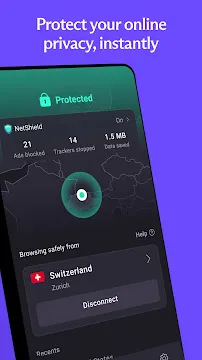
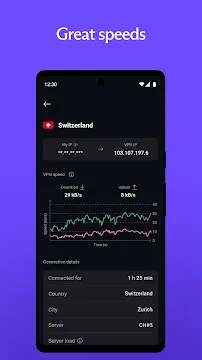
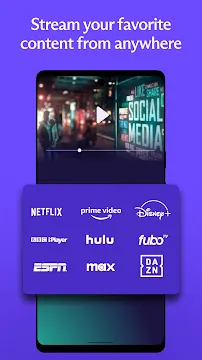
Proton VPN for Android is a powerful tool designed to keep your online activity private. It stands out because it prioritizes user security without compromising on speed or ease of use. Whether you use public Wi-Fi at a cafe or browse from home, this app creates a secure tunnel for your data. It hides your IP address and prevents others from tracking your digital footprint.
The app is built by the same team of scientists who created Proton Mail. This heritage ensures a strong focus on transparency and open-source technology. Many users appreciate that the free version has no data limits, which is rare in the VPN industry. It provides a clean, ad-free experience that helps you navigate the internet with peace of mind.
Why Choose Proton VPN for Your Android Device?
Staying safe online should be simple. The Proton VPN app for Android provides a powerful yet user-friendly way to protect your digital life. Whether you are using public Wi-Fi at a cafe or browsing at home, this app ensures your data remains private.
Here are the key features that make Proton VPN a top choice for Android users.
Instant Protection with One-Tap Connect
Security should never be a chore. The Quick Connect feature is designed for speed and convenience.
- How it works: You simply tap the large power icon on the home screen.
- The benefit: The app automatically finds the fastest server near your location.
- Instant safety: Within seconds, your internet traffic is encrypted and your IP address is hidden.
Bypass Restrictions with Stealth Protocol
Many networks, such as those in schools, offices, or restrictive countries, try to block VPN connections. Proton VPN overcomes this with its unique Stealth protocol.
- Hide your VPN use: Stealth makes your VPN traffic look like regular web browsing.
- Beat censorship: This feature allows you to bypass firewalls and access blocked content.
- Stay connected: It is perfect for users who need a stable connection on highly monitored or restricted networks.
Flexible Control with Split Tunneling
You might not want every single app on your phone to go through the VPN. Split Tunneling gives you total control over your traffic.
- Customize your connection: You can choose specific apps to bypass the encrypted tunnel.
- Use local services: Keep your banking app on your regular connection to avoid security alerts, while your browser stays protected by the VPN.
- Optimize speed: By excluding data-heavy apps that don’t need privacy, you can maintain faster speeds for the tasks that matter most.
Advanced Protection with NetShield (Paid Feature)
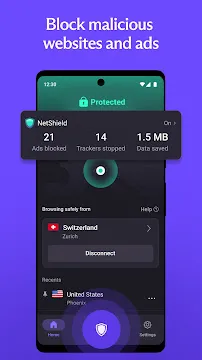
If you have a paid Proton VPN plan, you gain access to NetShield. This tool acts as a powerful gatekeeper for your Android device.
- Block Ads: Browse the web faster without annoying banners and pop-ups.
- Stop Trackers: Prevent marketing companies from following your movements online.
- Malware Defense: NetShield checks a database of dangerous sites and blocks them before they can infect your phone.
Total Privacy with the Kill Switch
Mobile users frequently switch between Wi-Fi and LTE. This transition can sometimes cause a VPN to drop for a split second, exposing your real location. The Kill Switch prevents this risk.
- Always guarded: If the VPN connection fails, the Kill Switch immediately stops all internet traffic.
- No data leaks: Your real IP address is never exposed to the public internet.
- Essential for mobility: This feature is vital for anyone who moves between different networks throughout the day.
How to Download And Install Proton VPN APK for Android
Proton VPN is a leading choice for online privacy. Many users prefer the APK version to avoid app stores or access specific updates. This guide explains how to get the app onto your Android device safely and quickly.
Why Use the Proton VPN APK?
Using an APK file gives you more control over your software. You might choose this method for several reasons:
- Privacy: You can install the app without using a Google account.
- Accessibility: It works on devices that do not have the Play Store.
- Updates: You may get access to the latest features or bug fixes faster.
- Censorship: It helps you bypass blocks if an app store is restricted in your region.
Phase 1: Prepare Your Android Device
Android devices block apps from unknown sources by default. You must change your settings to allow the installation.
- Open the Settings app on your phone.
- Navigate to Apps or Security.
- Look for Special App Access.
- Tap on Install Unknown Apps.
- Select your web browser (like Chrome, Edge).
- Toggle the switch to Allow from this source.
Phase 2: Download the Official APK
Open your mobile browser.
- Visit the Filetomob.com website.
- Search For Proton VPN APK Download.
- Go to the Download Page.
- Look for the link labeled Download APK.
- Tap the link to start the download.
- Confirm the download if your browser shows a warning.
Phase 3: Install the Proton VPN App
Once the download finishes, you are ready to install. Follow these simple steps:
- Open your Notifications or your File Manager app.
- Locate the downloaded file (usually named ProtonVPN.apk).
- Tap the file to open it.
- A prompt will ask if you want to install the application.
- Tap Install at the bottom of the screen.
- Wait for the progress bar to finish.
- Tap Open to launch the app immediately.
Phase 4: Set Up and Connect
After installation, you need to configure the app for the first time.
- Log In: Enter your Proton credentials. If you are new, create a free account.
- Permissions: Grant the app permission to create a VPN connection. Android will show a “Connection Request” pop-up. Tap OK.
- Quick Connect: Tap the Quick Connect button. The app will find the fastest server for your location.
- Choose a Country: You can also scroll through the list to select a specific server location manually.
Security Tips for APK Users
Keep your device safe by following these best practices:
- Disable Unknown Sources: After the installation is complete, go back to your settings. Turn off the “Install Unknown Apps” permission for your browser.
- Keep it Updated: Check the Play store regularly for newer versions.
Proton VPN App for Android: UI, UX, and Essential Features
Proton VPN for Android combines high-level security with a smooth, modern design. The app makes it easy for anyone to protect their data. Whether you are a beginner or a power user, the interface feels natural and responsive.
Quick Connect: Instant Protection
The Quick Connect button is the fastest way to secure your phone. It sits prominently on the home screen for easy access.
- Smart Selection: When you tap the button, the app analyzes your current location.
- Speed Optimization: It automatically finds the server with the lowest “load” and the fastest response time.
- One-Tap Ease: You do not need to scroll through lists to get a secure tunnel.
This feature is perfect for users on public Wi-Fi. It ensures you have the best possible speeds without any manual setup.
Navigating the Server Network
Proton VPN offers multiple ways to find the right connection. The Android app provides a flexible layout to suit your browsing style.
The Map Interface
The app features an interactive world map. You can zoom in and tap on specific countries to connect. This visual approach helps you see exactly where your data is traveling. It makes the experience feel more immersive and transparent.
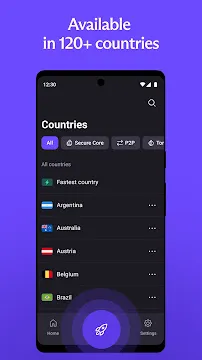
Detailed Country List
If you prefer a classic view, use the Countries tab.
- Search Bar: Quickly find a specific nation by typing its name.
- City Selection: Paid users can expand a country to see specific cities. This is helpful if you need a connection in a specific state, like New York or California.
- Server Labels: Look for specialized icons. Some servers are optimized for P2P (file sharing) or Tor (extra anonymity).
Specialized Streaming Servers
To find servers optimized for media, search for labels like “US-Streaming.” These servers ensure you can watch your favorite shows without buffering or blocks. You can even save these specific servers to your “Recent” or “Pinned” list for later.
Always-on VPN: Non-Stop Security
Mobile devices often switch between Wi-Fi and cellular data. These transitions can briefly expose your IP address. To prevent this, Proton VPN uses the Always-on VPN feature.
How to Enable Always-on Protection
This setting integrates directly with your Android system. Follow these steps to set it up:
- Open the Proton VPN app and go to Settings.
- Tap on Features and select Kill Switch.
- Click the button labeled “Open Android Settings.”
- Find Proton VPN in the list and tap the Gear icon next to it.
- Toggle the switch for Always-on VPN.
- For maximum security, toggle Block connections without VPN.
Why This Matters
Once active, Android ensures the VPN tunnel is always live. If the VPN connection drops, your phone will stop all internet traffic immediately. This “Kill Switch” functionality prevents accidental data leaks. You can go about your day knowing your protection never sleeps.
Proton VPN App for Android: Performance and Speed
Proton VPN is a top choice for Android users who prioritize privacy. However, a VPN is only useful if it maintains high speeds and a stable connection. Recent 2026 benchmarks show that Proton VPN has significantly closed the speed gap with its competitors.
Here is a detailed breakdown of how the Proton VPN Android app performs in real-world tests.
Baseline Speed: VPN vs. No VPN
To understand the impact of the VPN, we first look at the “speed tax.” This is the percentage of speed lost when you encrypt your data.
- No VPN (Base Speed): 300 Mbps download / 300 Mbps upload.
- With Proton VPN (WireGuard): 265 Mbps download / 250 Mbps upload.
- Performance Retention: Approximately 85–90%.
Using the WireGuard protocol on Android ensures that the encryption process is lightweight. Most users will not notice a difference during standard browsing or high-definition scrolling.
Local vs. Long-Distance Performance
Distance is the biggest enemy of speed. When data has to travel across the globe, latency (ping) increases.
Local Connections (Same Country)
Connecting to a server in your own city or country yields the best results.
- Latency: Very low (typically 5–20ms).
- Experience: Feels identical to a regular internet connection. Ideal for mobile gaming and video calls.
Long-Distance Connections (Across Continents)
Connecting from the US to Singapore or the UK to Australia introduces more “hops” for your data.
- Latency: High (150ms to 300ms+).
- VPN Accelerator: Proton uses a unique “VPN Accelerator” technology. This overcomes CPU limitations and network congestion.
- Result: While the ping stays high, the download speeds remain surprisingly stable, often reaching 150+ Mbps even on the other side of the world.
Streaming Performance on Android
The Proton VPN Android app is excellent for bypassing geo-blocks. You must use a Plus (paid) plan to access streaming-optimized servers.
- Netflix: Successfully unblocks libraries in the US, UK, Japan, Canada, and several other regions.
- Disney+: Works consistently without the “service unavailable” error.
- BBC iPlayer: Highly reliable. Proton maintains a 100% success rate by frequently refreshing its UK IP addresses.
- Video Quality: Thanks to high-bandwidth 10 Gbps servers, 4K HDR streaming is smooth with minimal buffering.
Battery Consumption and Optimization
Many users worry that a VPN will “kill” their phone battery. Proton VPN addresses this through modern protocol choices.
- Protocol Efficiency: The app uses WireGuard by default. This protocol has a much smaller code footprint than older ones like OpenVPN.
- CPU Usage: WireGuard requires less processing power to encrypt data, which keeps the phone cooler and saves energy.
- Background Usage: In 2026 tests, Proton VPN typically accounts for only 1–3% of total daily battery drain.
- Pro Tip: If your Android system “kills” the app to save power, you should go to the app settings and set Battery usage to “Unrestricted.” This ensures the VPN stays active without significantly increasing drain.
Conclusion
Proton VPN on Android offers a premium balance of speed and security. It is fast enough for 4K streaming and efficient enough to stay on all day without draining your battery.
Proton VPN: Free vs. Paid (Proton VPN Plus)
Choosing a VPN for your Android device comes down to what you value most. Proton VPN offers two clear paths. One is a powerful free version. The other is a feature-packed paid tier. Here is a direct comparison to help you decide.
The Free Version: Unlimited and Private
Proton VPN’s free plan stands out from the crowd. Its main selling point is simple. You get unlimited data.
There are no data caps. You can browse, stream, and use apps as much as you want. This is rare for a free VPN. Most free options limit you to a few gigabytes per month. Proton VPN does not.
However, the free version does have limitations. It is built for basic privacy, not advanced use. Here is what to expect:
- One Device Only: You can connect only one Android device at a time.
- Medium-Speed Servers: The free servers prioritize stability over speed. You will have a reliable connection, but it is not built for high-bandwidth tasks.
- Limited Country Selection: You can only connect to servers in a few countries. This gives you basic geo-switching but not a wide range of options.
- No Secure Core: Your traffic passes through a standard server setup. You do not get the extra layer of protection that Secure Core provides.
The free version is ideal for secure browsing and everyday privacy. It is a solid choice if you need a trustworthy VPN without spending money.
Proton VPN Plus: The Full Experience
Proton VPN Plus removes all the free version’s limitations. It is designed for speed, security, and flexibility. You get a complete toolkit for your Android device.
Here is what the paid version unlocks:
- Unlimited Devices: You can connect all your devices at once. Use it on your Android phone, tablet, and other gadgets simultaneously.
- Secure Core: This is a major security feature. It routes your traffic through multiple servers in privacy-friendly countries first. This protects against network-based attacks.
- High-Speed Servers (10 Gbps): Enjoy extremely fast connections. These servers support smooth 4K streaming, large file downloads, and fast browsing.
- P2P/BitTorrent Support: You can use the app for torrenting on your Android device. The Plus servers are optimized for peer-to-peer file sharing.
- Streaming-Optimized Servers: Access popular streaming services reliably. The Plus servers are specifically configured to bypass geo-restrictions.
Pricing Options
Proton VPN Plus offers flexible plans to fit your budget. You save more when you commit for a longer period.
- Monthly Plan: This is the most flexible option. You pay month-to-month with no long-term commitment.
- Yearly Plan: This option gives you a significant discount compared to the monthly rate. It is a balanced choice for regular users.
- 2-Year Plan: This provides the best value. You get the lowest effective monthly rate by paying for two years upfront.
Which One Should You Choose?
Choose the free version if you are a casual user. It works well for secure browsing, light streaming, and protecting your privacy on public Wi-Fi. The unlimited data makes it a sustainable option.
Upgrade to Proton VPN Plus if you need more. It is the right choice for power users. Get it for fast streaming, torrenting on your Android device, connecting multiple gadgets, and using the advanced Secure Core protection.
In short, the free version offers unmatched privacy at no cost. The paid version delivers top-tier performance and security for your entire digital life.
Proton VPN: Pros & Cons
Finding a reliable VPN for your Android device can feel overwhelming. Proton VPN stands out as a top contender, especially for those who prioritize security. Developed by the scientists at CERN, this app brings high-level encryption to your phone.
However, every tool has its strengths and weaknesses. This guide breaks down the pros and cons to help you decide if Proton VPN fits your mobile lifestyle.
The Pros: Why Users Love Proton VPN
Proton VPN offers several unique benefits that many other providers struggle to match.
- Strong Privacy Protections: The company operates out of Switzerland. This is a major advantage because Swiss laws provide some of the best privacy protections in the world. They do not belong to surveillance alliances like the “Five Eyes.”
- Unlimited Free Data: Most free VPNs cap your data or show annoying ads. Proton VPN offers an excellent free tier with no data limits. You can browse as much as you want without paying a cent.
- Intuitive Android Interface: The app is very easy to use. It features a clean map view and a simple “Quick Connect” button. Even beginners can navigate the advanced settings without feeling confused.
- Advanced Security Features:
- NetShield: This tool blocks ads, trackers, and malware at the DNS level. It makes your browsing faster and cleaner.
- Secure Core: For extra safety, this feature routes your traffic through multiple servers in privacy-friendly countries before leaving the network.
- Fast Connection Speeds: If you upgrade to a paid plan, you gain access to high-speed servers. These are optimized for gaming and heavy downloading.
The Cons: Potential Drawbacks to Consider
While the app is powerful, it does have a few limitations that might affect your experience.
- Streaming Restrictions on Free Tier: You cannot bypass geo-blocks on Netflix or Disney+ using the free version. You must purchase a “Plus” plan to unlock streaming capabilities.
- Speed Drops with Secure Core: The Secure Core feature provides incredible security. Unfortunately, routing your data through multiple extra servers can slow down your internet speed significantly. Most users should only use this in high-threat situations.
- Higher Pricing: Proton VPN is generally more expensive than rivals like NordVPN or Surfshark. While the quality is high, the monthly or yearly cost might be a hurdle for budget-conscious users.
- Limited Free Server Locations: The free plan only connects you to servers in a few countries. You cannot choose specific locations unless you pay for a subscription.
Final Verdict
Proton VPN is a fantastic choice for Android users who value transparency and Swiss-grade security. The free version is arguably the best on the market for basic browsing. However, if your main goal is cheap streaming or ultra-fast speeds across all features, you might want to compare it with other premium options.
Frequently Asked Questions About Proton VPN For Android
What is Proton VPN for Android?
It is a security app. It encrypts your internet connection. This protects your data from hackers. It also hides your IP address. Your online activity stays private.
Is there a free version available for Android?
Yes. Proton VPN provides a Free plan with no data caps or speed limits. It does not show ads and it does not sell your browsing history. While it offers fewer server locations than paid plans, it remains a highly secure option.
Does it work on older Android versions?
The app generally supports Android 6.0 and above. For the best security and performance, you should always keep your operating system updated to the latest version your phone allows.
What is the “Kill Switch” feature?
The Kill Switch is a vital security tool. If your VPN connection drops unexpectedly, the Kill Switch instantly blocks all internet traffic. This prevents your real IP address from leaking to the web.
How does “Split Tunneling” work?
Split Tunneling gives you control over which apps use the VPN. You can choose to protect your web browser while allowing your banking app or local delivery app to use your standard connection. This helps maintain access to local services while staying private elsewhere.
What are “Secure Core” servers?
Secure Core adds an extra layer of protection. It routes your traffic through multiple servers in privacy-friendly countries like Switzerland or Iceland. This defends against advanced network attacks that might compromise a single VPN server.
Will the VPN drain my battery?
Any app running in the background uses some power. However, Proton VPN uses efficient protocols like WireGuard. This protocol is designed to be fast and lightweight, which helps minimize battery consumption compared to older technologies.
Why is my connection speed slow?
Several factors can impact your speed:
- Server distance: Choosing a server far away can increase latency.
- Server load: Highly populated servers may move slower.
- Network type: Switching from cellular data to Wi-Fi often improves stability.
Can I use the VPN for streaming?
Yes, but this typically requires a Plus subscription. Paid plans provide access to specialized servers optimized for high-speed streaming and bypassing geo-restrictions on popular platforms.
Does it keep logs?
No. Proton VPN follows a strict no-logs policy. The company does not track your browsing. It does not record your IP address. Your activity remains yours alone.
Do I need to create an account?
Yes. You need an account to manage your subscription and connect to the servers. You can sign up using an anonymous email address if you want to maintain a higher level of anonymity.
Is it safe for public Wi-Fi?
Yes, it is ideal for public Wi-Fi. Airports, cafes, and hotels pose risks. The app encrypts your data instantly. This prevents others from stealing your information.
How fast is the connection?
Speed depends on your location and server. Premium servers offer faster speeds. The app automatically selects the fastest server. You can also choose a server manually for better performance.
Does it work with other apps?
Yes, it works system-wide. Once connected, all apps use the VPN. This includes your browser, banking apps, and social media. Everything stays protected.
Can I switch servers?
Absolutely. Tap the “Profiles” or “Countries” tab. Scroll through the list. Tap any server to connect. Switching takes seconds.







